
FAQ About LoveTrackers

How to Start Sharing Locations?
LoveTracker is a consent-based location sharing app designed for families and trusted circles. You can only see someone's location after they accept your invitation and agree to share.
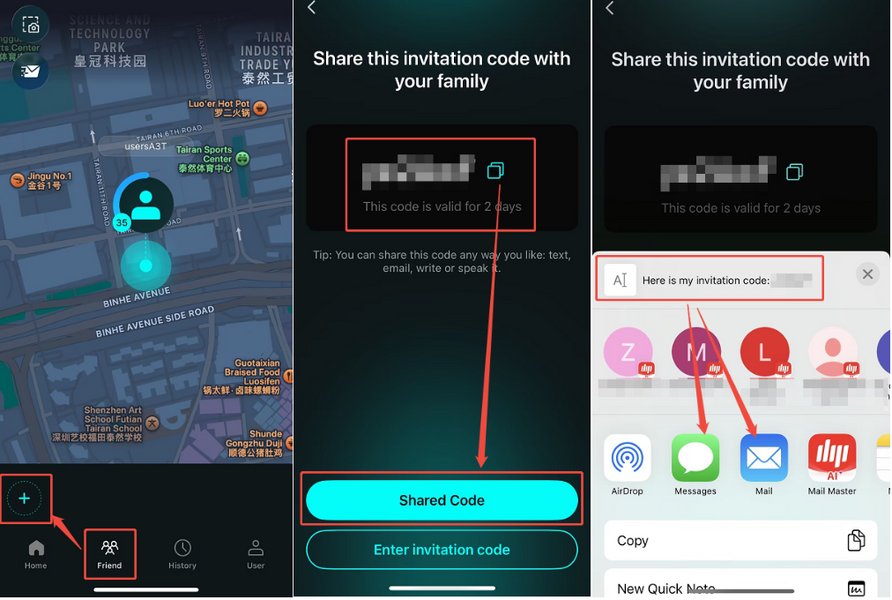
Step 1: Invite a friend or family member
1. Open LoveTracker and allow location access.
2. Tap the Friend icon (second from the left at the bottom).
3. Tap the "+" button in the bottom‑left corner.
4. Copy the invitation code and share it with your friend.
(You can share it any way you like — via text, email, or even tell them directly.)
Step 2: Your friend accepts the invitation
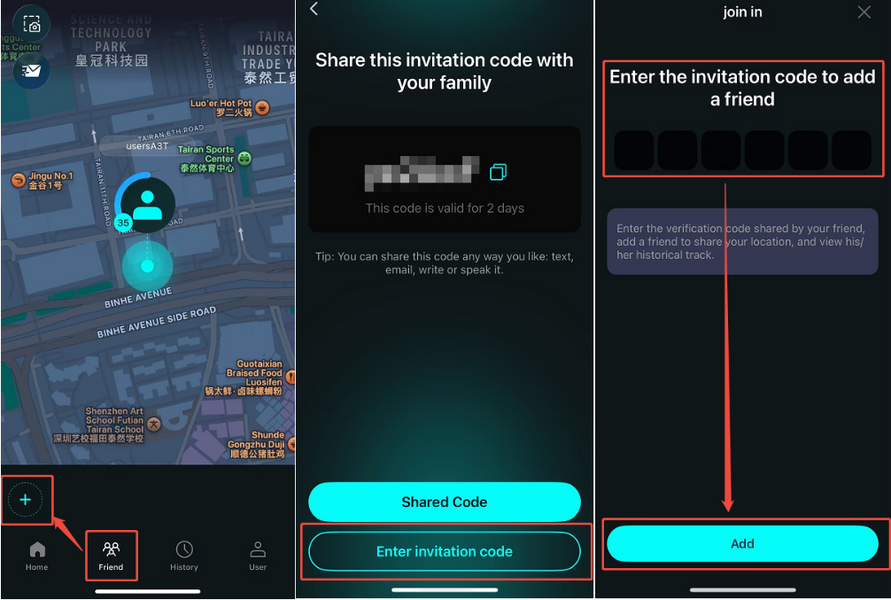
1. Your friend opens LoveTracker and allows location access.
2. They tap the Friend icon, then the "+" button.
3. They enter the invitation code you sent.
✅ That's it. Once both sides complete these steps, you'll see each other's live locations on the map.
⚠️ Important to Know
● Location updates only happen when the app is open and sharing is enabled.
No updates occur when the app is closed or location permission is turned off.
If your friend's location still isn't showing after they enter the invitation code, the most common reason is that they haven't granted LoveTracker permission to access their location on their device.
How to fix it:
Ask your friend to go to their device Settings (the system settings on their phone, not the app settings):
Settings → Apps → LoveTracker → Permissions → Location → Allow
Once location access is re‑enabled, their location should appear.
💡 Need More Help?
If you're still having trouble, feel free to reach out to us at [email protected] — we're happy to guide you through it.
Our working hours:
Mon – Fri, 9:30 AM – 6:30 PM (UTC+8)
We'll get back to you as soon as possible during business hours.
