
FAQ About LoveTrackers

How to Set Up or Change Your Account Information?
You can update your account details — such as your login email, password, profile photo, and display name — at any time.
Steps:
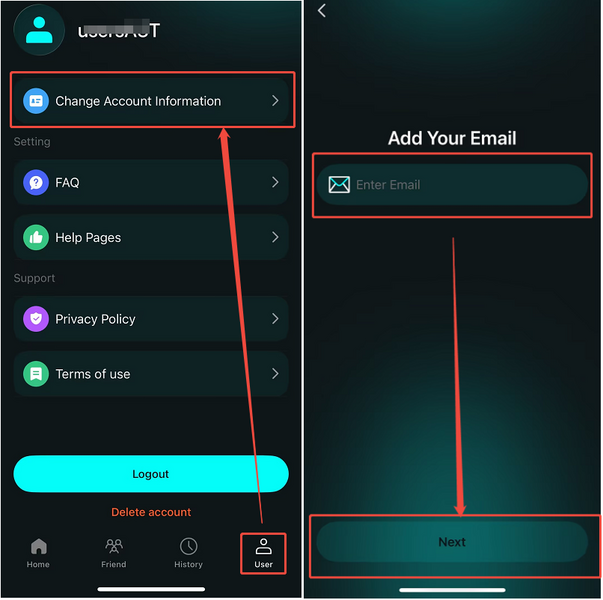
1. Tap the "User" icon (the last icon at the bottom of the screen).
2. Select "Change Your Account Information".
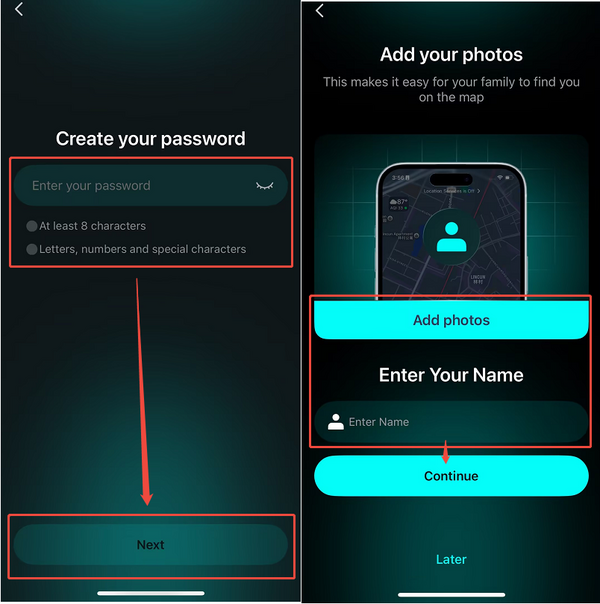
3. Set your login email and password
Enter your email address and choose a password. This will be the email you use to log in to LoveTracker.
4. Add your profile photo and display name
Upload a photo as your avatar and enter the name you'd like your friends to see on the map.
5. Tap "Continue" to save your changes.
💡 Need More Help?
If you're still having trouble, feel free to reach out to us at [email protected] — we're happy to guide you through it.
Our working hours:
Mon – Fri, 9:30 AM – 6:30 PM (UTC+8)
We'll get back to you as soon as possible during business hours.
