
FAQ About LoveTrackers

Widget Functions Guide
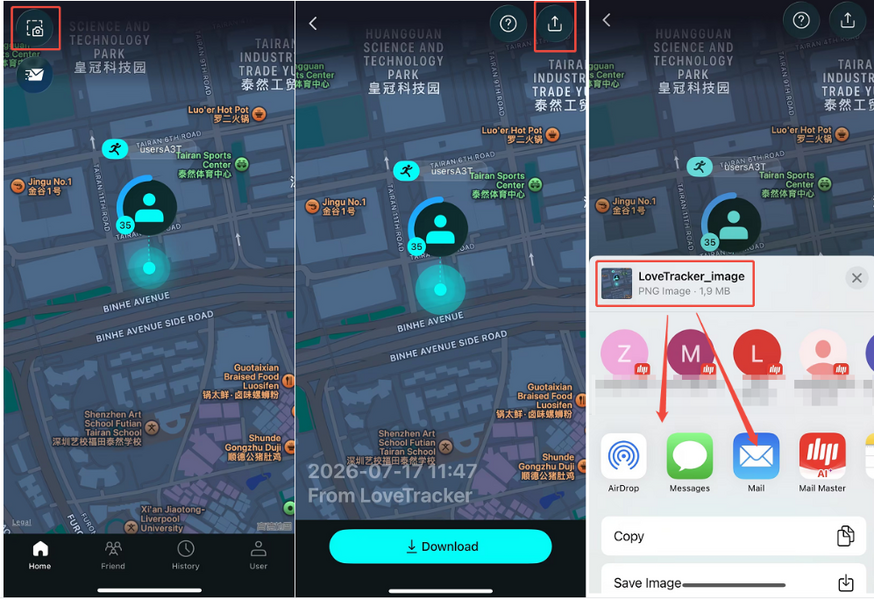
Location: First icon in the top‑left corner.
Tap this icon to take a screenshot of your current location‑sharing page. The image will show the approximate locations of both you and your friend(s).
After taking the screenshot, you can:
● Tap Download to save it to your device.
● Tap the Share icon in the top‑right corner to send the screenshot to a friend.
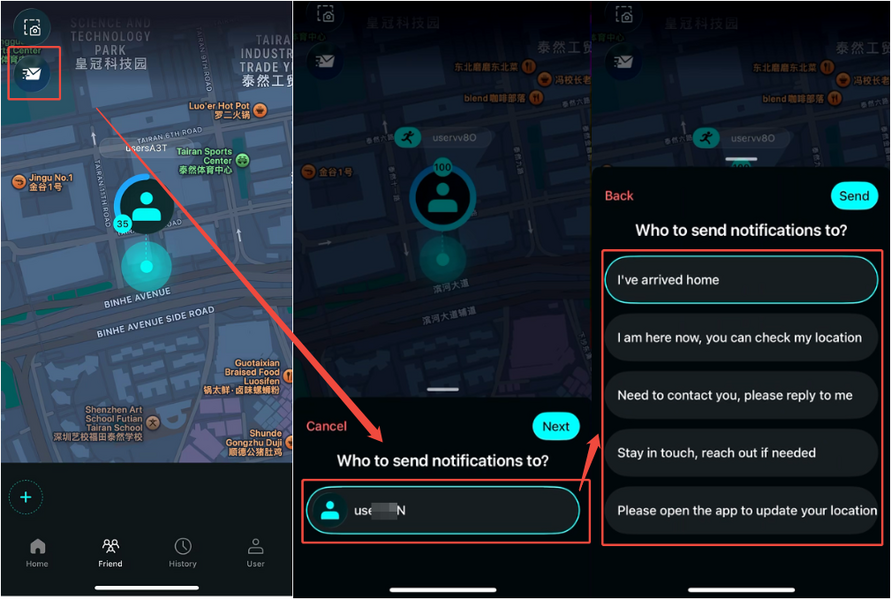
Location: Second icon in the top‑left corner.
Use this feature to send a pre‑set status message to your friend, letting them know your current situation without typing.
How to use it:
1. Tap the Quick Status icon (second from the left at the top).
2. Select the friend you want to notify.
(If your friend list is empty, please send an invitation code first. See "How to Start Sharing Locations?" for details.)
3. Choose one of the status messages to send
Once selected, the message will be sent immediately to your friend.
💡 Need More Help?
If you're still having trouble, feel free to reach out to us at [email protected] — we're happy to guide you through it.
Our working hours:
Mon – Fri, 9:30 AM – 6:30 PM (UTC+8)
We'll get back to you as soon as possible during business hours.
